
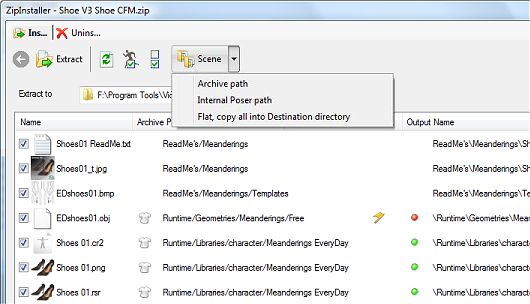
note this picture has been edited to showcase errors for tutorial purprose. The original ZIP file (by Digital Meanderings) was perfect.
Overview
ZipInstaller will plug itself in Files menu and add a shortcut icon to P3dO's InDepth toolbar.ZipInstaller may be used as a classic unzipper. But when Poser files are detected within an archive, it does a number of supplementary operations.
- Install/Uninstall a figure file from a ZIP into Poser.
- Check path validity in ZIP (relative to Poser requirements) and fix wrong paths.
ZipInstaller has 2 main features:
 Install Uncompress archive content to your HD.Uninstall Remove previously unzipped
files from your disk.
Install Uncompress archive content to your HD.Uninstall Remove previously unzipped
files from your disk.Note ZipInstaller needs the P3dO ZipExplorer plugin to be installed (which is what P3dO does by default, then this is just FYI).
Calling from P3dO
Click the ZipInstaller icon in InDepth toolbar or call from file menu ("Unzip to").
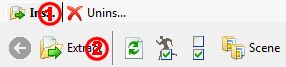 Click the Upper Tab (#1) to set
the mode you wish to use: Install or Uninstall. Select files, fix paths (see next paragraph). Click button (#2) to actually
Extract (Unzip) to disk or Uninstall (Delete) from disk.
Click the Upper Tab (#1) to set
the mode you wish to use: Install or Uninstall. Select files, fix paths (see next paragraph). Click button (#2) to actually
Extract (Unzip) to disk or Uninstall (Delete) from disk. ZipInstaller has been designed to be easy to use with Poser
files. In order to fix a Poser path you do not need to click the browse button to
navigate to a subdirectory of a Poser Runtime.
Click the
ZipInstaller has been designed to be easy to use with Poser
files. In order to fix a Poser path you do not need to click the browse button to
navigate to a subdirectory of a Poser Runtime.
Click the  Scene button instead and let
the plugin do the job for you.
Scene button instead and let
the plugin do the job for you.
Toolbar buttons
Extract
Uncompress selected source files to the Output location (as indicated in "Output path"
column - the final output being "Runtime" + "Output path").Uninstall
Delete the selected files from disk. warning: Uninstall will not delete any file
in the ZIP itself but undo a previous installation thus removing files from your disk.Refresh
This is a helper button that can be used to re-evaluate grid content.
It will check again for collision detection.Select Scene Select all Poser files, thumbnails
and References and unselect others.Unselect All
Quick select/unselect helper.Destination subfolder
The relative path in ZIP does not necessarily match with Poser requirement.
This button offers various alternative solutions:- use the ZIP archive structure (Archive)
- use Poser file References. This will also fix problems from Poser References (Scene)
- copy all into the destination directory (Flat)
Non 3D files - e.g. pictures - don't have a relative path and thus simply go into the destination or ZIP directories. The Poser button has no effect on such files destination.
List columns
Name and Archive Path columns are the actual
file location in ZIP.Extract to and Output Name make the final file
location. Output Name being the path relative to Destination directory.The destination Runtime may be changed by selecting a Runtime in the runtime combo. You may also choose any other directory by using the Folder selection button.
Collision a check mark in this column indicates
the destination file already exists.warning: if you edit an Output Name collision status will not be checked. Click the Refresh button to do so.
Scene indicates this file is part of a Poser file.
This is a helper to indicate which file should be unzipped.Please read the Overview paragraph above for the howto procedure.
In summary click the Extract button and ZipInstaller will unzip the selected content
to your hard disk under the location specified by the Extract to field.
Invalid paths issues and fix
ZipInstaller will compare ZIP paths to Poser requirements and to the Poser file References
contained in the archive.
 Green: the ZIP path has a perfect
match to Poser. You may unzip as-is without problem.
Green: the ZIP path has a perfect
match to Poser. You may unzip as-is without problem.
 Orange: a warning. The ZIP
path is valid but different from the internal Poser path or the path need to be completed
(partial path).
Edit manually or set the Destination button to Scene.
Orange: a warning. The ZIP
path is valid but different from the internal Poser path or the path need to be completed
(partial path).
Edit manually or set the Destination button to Scene.
 Red: is for wrong or empty paths. Again Edit
manually or click the Scene button.
Red: is for wrong or empty paths. Again Edit
manually or click the Scene button.
Warning
A red mark doesn't necessarily mean you have to modify the unzip path. The internal path
in Poser may be wrong and the Zipped path ok.
Generaly speaking Textures path errors will still load in Poser, while Geometries are not.
So pay attentions to Geometries paths errors rather than Textures.
Notes
-  This helper icon tells you when a file is
a Poser file or when a Reference belongs to a Poser scene. Images not belonging to the scene
need not be extracted. You may click the Select Scene button to exclude those.
This helper icon tells you when a file is
a Poser file or when a Reference belongs to a Poser scene. Images not belonging to the scene
need not be extracted. You may click the Select Scene button to exclude those.
- During Extraction Destination directory structure is automatically created
(missing directories will be created).
- By setting the Destination subfolder button to Scene
the path is either completed if partial or set to the internal Poser path in Reference,
the internal Poser path being preferred if found. When the path is set as such it is
necessarily ok. Completing a path on the contrary is always a guess. But even then you
should only be careful with References (Textures and Geometries) which are the only one
requiring a precise path.
The purpose of Uninstall is to remove file installed from a ZIP.
ZipInstaller doesn't require an Unsetup list or anything like that and is thus able to
Undo previous installations from any Unzipper.
From P3dO click a ZIP file and open ZipInstaller as you would to install it but instead
select the Uninstall mode.
All files detected by ZipInstaller (Collision column checked) will be removed
when you click the Uninstall button.
Notes
- Empty directories deleted.
That is directories where the files were previously stored. For safety reasons
those directories parent directories are not checked nor deleted.
- ZipInstaller will remove files installed from other Unzippers as well. All the needed
information are taken from the ZIP itself, thus you may use the uninstallion even if you
didn't installed a Scene with ZipInstaller.