
Overview
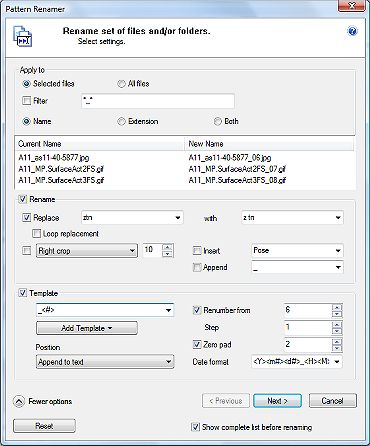
Pattern Renamer is a mass renaming plugin.It is important to note that transformations apply in the same order as the screen: Replacement, croping, insertion (insert/append).
However when template is applied this order is : Replacement, croping, template, insertion.
Keep to mind that "Insert" and "Append" is always last.
Rename and/or Template
You may just Rename, just use a Template or both.
Note that renaming/template doesn't necessary means changing string or number values. You can for example use renaming to change extensions to lowercase (i.e JPG to jpg) or renumbering to change a number format (i.e. 06 to 0006).
Although renaming is rather straigh forward, templates are more subtil. It is recommended to read the "Template" section carefully before using them.
Wizard mode & Error checking
With massive renaming collision names may occur. You may also want to check/modify your settings before renaming.
Pattern Renamer starts with the above Select Form. By clicking "Show complete list before renaming" the Detail Form (see Detail Form below) is shown before any renaming.
In case of collision between names (file name already existing on the disk) the Detail Form will be prompted automatically.
The Detail Form gives the ability to modify your settings or edit individual file names.
When settings are correct cliking the "Ok" button does the actual renaming.
Simply note that renaming is a 1 or 2 steps process:
- Select - Ok
- Select - Detail - Ok
(pro) Renaming files in subdirectories
Pattern Renamer renames files that are displayed by P3dO. Thus when you click on "Explore Subfolders" in P3dO, P3dO will display the whole files within that directory structure. Then call Pattern Renamer to make any renaming you wish. This is the way Pattern Renamer is able to work on subfolders.
 Selected files | All files
Status of files which the plugin should ask from P3dO's current file list.
Selected files | All files
Status of files which the plugin should ask from P3dO's current file list.
Filter
A user defined filter to apply the renaming to a limited number of matching files.
Any file whose name match the entered text will be processed. Filter can also be a Regular Expression
pattern (Read more about Regular Expressions in P3dO's help file "Tips and Tricks" section).
Poser tip: wildcar filters will automatically rename attached .RSR and/or .PNG to a Poser library file
(so called associates in P3dO). On the contrary a filter with extension - i.e *.RSR - will have no
effect on Poser library parent files. .RSR are considered attached to Poser library files but not the
contrary.
Name | Extension | Both
The part of the file name to rename.
nota: Be carefull when renaming an extension. Windows heavily relies on extensions and changing
a file extension is generaly a mistake. But changing an extension from i.e. .jpeg to .jpg is not
because those two extensions have the same internal file format. The rename extension of Pattern
Renamer was designed with this in mind.
Sample preview sample files taken from
current P3dO selection are showing how the files will be renamed. The preview is limited
to 3 files. For a complete list check the "Show complete list before renaming"
button at the bottom of the dialog.
Reset
Restore all settings to default (empties the screen fields).
Show complete list before renaming
Show the Detail Form before actually renaming (see Detail Form below for more).
 RenameReplace
String to be replaced followed by replacing string (with). If the same string is encountered twice in the file name,
only the first one is replaced.
RenameReplace
String to be replaced followed by replacing string (with). If the same string is encountered twice in the file name,
only the first one is replaced.The replace with filed can be empty in which case replacement is an erasement.
Loop replacement
Replace all occurences of the replace string in file name.Length options:Left Crop
Number of characters to remove on the left side of the replaced string.Right Crop
Number of characters to remove on the right side of the replaced string.Truncate Left
Remove all characters after the given count, count starts from the end of the string.Truncate Right
Remove all characters after the given count, count starts at the beginning of the string.The length count doesn't take the extension (and dot) into account if the extension is not marked for renaming (i.e "Apply to" is set to "Name").
Insert
A string to insert at the beginning of the new file name. Note that when template is applied Insert
occurs after the template.Append
A string to add at the end of the new file name. Note that when template is applied Append
occurs after the template.TemplateTemplate
This a field with no label. It is a free editable field in which you may manually add,
modify or remove templates.Add Template
Button helper to add templates to the above field.Position
This is where the template is inserted in the file name.- Insert before text: initial name is not modified.
- Append to text: initial name is not modified.
- Override whole text: initial name is overridden.
- Override leftmost number: initial leftmost number is overridden, text and other numbers are not modified.
- Override rightmost number: initial leftmost number is overridden, text and other numbers are not modified.
Available templates:
| <#> | Renumber |
| <dir> | Directory Name |
| <dat_cre> | Creation date |
| <dat_mod> | Modified date |
Renumber formattingStart from
Number of first file. If unchecked the number is supposed to be extracted from the file name itself.Step
To apply to the above number (first file excluded).The Increment is applied to the number extracted from the file name or given by "Start from".
Maybe 0 if you just want to reformat a number.
Zero Pad
Used to format a number. Left pad the number with zeros so that the number of digits
in a number is equl to the Zero Pad parameter.For example with Zero Pad 3 (3 digits): 1 gives 001, 33 gives 033.
Note that numbers whose number of digits is greater (1000+ in the example) ignore this setting.
Zero Pad will not extend above 9 digits.
Date formattingDate format
Contains date format templates. Date format template is applied to date templates if any in the
above Template field.Date format is a free editable field in which you may manually add, modify or remove date templates.
Available date format templates:
| <y> | abreviated year - 10 for 2010 | or | <Y> | year - 2010 | |||
| <m#> | numeric month - 09 for September | or | <mA> | abreviated month - Sep for September | or | <mF> | September |
| <d#> | numeric day - 10 | or | <dA> | abreviated day of week - Fri | or | <dF> | day of week - Friday |
| <H> Hour | |||||||
| <M> Minute | |||||||
| <S> Second | |||||||
<Y>-<mA>-<d#>_<H>.<M> will translate into 2010-Sep-10_09.15
warning Templates are case sensitive pre-formatted strings. They must have an exact match with one of the above, including Tags signs (i.e. < and >). Erroneous templates will be ignored.
This is a simple 2 columns grid.
Current Name name to be replaced.
New Name replacing name.
Before any renaming occur it is possible to:
- modify single file names by editing the "New Name" column content.
- click the "Previous" button and go back to the Select Form
in order to modify your settings (any edited file name will be lost).
When Pattern Renamer detects a collision between file names (file already existing on the disk)
the Detail Form is automatically displayed once the Ok button has been clicked.
Problematic file names are colored in red. As long as those file named have not been corrected, or
the settings have not been changed, renaming will not be possible (Clicking the Ok button always
steps back to Detail Form).
After renaming, Detail Form is still available for information purpose but is read-only.
Shows a summary of renamed file.
A detailed report is available from the Detail Form, which is now read-only.