
Overview
Librarian scan your Poser and Daz|Studio runtimes for missing files or erroneous paths (called references).At the end of the scan, Librarian print a report with a link to the files who have to be fixed, and the wrong references list. A sample html report is shown at the bottom of this help file.
Limits
Librarian doesn't fix the references, this will be the purpose of a further evolution of the plugin.
Librarian add a new menu entry to P3dO Explorer's Tools menu:
 Poser Librarian
This will open the Librarian wizard.
Poser Librarian
This will open the Librarian wizard.
Scan Libraries vs. Report from Scans
In Librarian itself you may opt for 2 kind of Librarian:
Scan
Will explore your Runtimes and then generate a Report.
Report
Will use data from previous Scan and just generate a Report.
When to use Scan and Report
"Report" is a subset of "Scan".
The Scan will read data from your Runtime, while Report will just read
data gathered by the Scan.
Report is not able to detect any change that occured since the last scan.
You need to run at least one Scan on a given Runtime before being able to run the
Report Scan Result.
- Scan is slower but builds an accurate report.
- Report is fast can be used to vary reports content once the data have been scanned.
It is up to you to decide when you should Scan (that is Refresh) your Librarian references
database.
In order to help you, Librarian is showing the last Scan date for each Runtime.
This step will explore selected runtimes libraries paths and generate a database that will be used in next step by "Report".
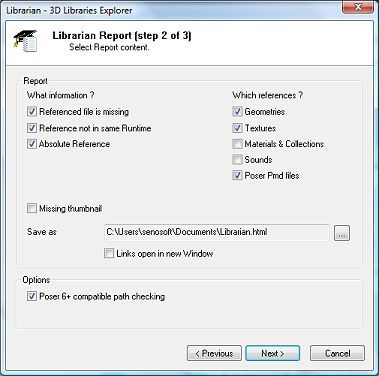
At the end of the scan process the "Report" dialog is showing (above dialog) so that you can set your preferences for the final report.
"Scan" is the required step in order to be able to generate reports. But you don't need to Scan your Libraries each time you need a report. Since "Scan" is storing references in a database it's up to you to decide when you need to refresh the database content.
Scan speed optimization
Just scan what you need to:
- Select Runtime You may reduce scan time by selecting the Runtimes you want Librarian to explore.
- One Runtime at a time You may scan your Runtimes one by one, data from other Runtimes won't be overridden.
- Select a Directory You may scan a single directory (and its subdirectories). If that directory belongs to a Runtime, Librarian will update that Runtime data. Thus you may use this to refresh a Runtime content where only a few directories have been changed.
Scanner is fast and has proven to be able to scan files at a 1,000+ figure files per minute rate. Thus all runtimes scan process is as fast as a quarter of an hour on modern machines with average runtimes.
Note that if running on an already scanned Runtime the Scanner is even faster.
Runtime(s)/Folder
The directory may be outside Poser/Daz libraries.Ignore Poses, except for MAT files
This tells Librarian not to parse Poses files. Note however that any Pose with MAT
in the name or path will still be parsed.Unchecking this instructs Librarian to check files which otherwise it would simply ignore. Since Librarian is only storing files with References in its database, reading Poses files will change little to the final report. Unless you have many MAT files that don't have MAT in name, in which case unchecking is recommended.
Also note that because there are so many PZ2 INJ and REM, Poses files outside Poser Poses Library will never be reported (unless they are MAT files).
Include previously selected Folder in report
When you select an individual folder, instead of a whole Runtime, that folder is saved to the
database.
As so Librarian is able to recall folders for further scan or reports.Use different Runtime selection for Scan and Report wizards
this parameter is to "Scan" your Runtimes one at a time, but have a "Report"
for all you have already scanned.It is not recommended to check the "Scan Poses" option, since it will add a great number of somewhat minor files in Librarian database and slow it down.
"Report" is the selection for the Librarian report.
Because it is using data from the scan, "Report" needs "Scan" to be run at least once before it is called. However you don't need to scan all Runtimes for this, but just the ones you want to be reported.
The selection options may greatly vary a report content. Thus the same database Scan may produce different reports for different usages.
Here are the selection options:
What information ?
Referenced file is missing
Figure files with missing file reference, can also be a wrong reference (some misspell in path).Absolute Reference The path is an absolute one.
This is not to be considered an error but for maintenance and performance reason it is better to
have relative paths.Reference not in same Runtime
Not an error either, but files not in same Runtime as the figure file, may slown down Poser loading
time since it has to retrieve the files among Runtimes.Missing thumbnail
The file doesn't have a PNG or RSR thumbnail. An information rather than an error.Because Librarian is only reporting files with References, Pure Poses files are not reported here.
Which references ?
Geometries
Geometry path (typically a figureResfile path).Textures
Any kind of texture path (including Bump files).Materials & Collections
References from Materials (MT5), Collections (MC6) & Poses (PZ2) will be added to the report.Sounds
Check Wave files if any.Poser Pmd files
You may also want to check this new Poser 6 file reference (Poser 6 and above).Save as
This is where you select the output file where Librarian will store its report. You may select a text
or html file extension. The html report is far more fancy than the text one.Links open in new window
Links in the html report will open in a new browser window, instead of the same window when clicked.Poser 6+ compatible path checking
Poser 6 and above are more permissive than previous versions and, though the inner path might be wrong,
Poser could manage to load the Geometries and Textures. If you check this option Librarian won't
report those paths as missing provided Geometries and Textures are in proper location according to Poser 6
logic.Important
Pay attention to the fact that "Report" doesn't update the database.
You have to maintain the data accuracy by running "Scan" from time to time.
Also you need to run "Scan" at least once on a Runtime before asking "Report" to report for that Runtime.
At the end of database analysis the report is generated into the output file (see "Report Scan Result"). You may open the report file from Librarian, so you don't have to navigate to it.
The report is a list of figure files and references in their native Poser code.
In the Html form (features below) you may navigate to the files location by clicking their respective links.
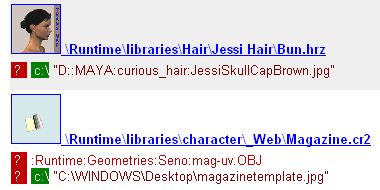
Text colors are just meant for clarity. Red is for Geometry paths, dark red for Texture paths, black for other references.
Each reference also gets a colored node that indicate the reason why it was reported:
?Referenced file is missing c:\Absolute Reference RReference not in same Runtime
Reasons are cumulative, so a reference may have several colored nodes (as shown above).
About totals:
The html report also has totals indicating the number of reported files. Subtotals indicate the number of references reported and thus may be greater than files total.
P3dO Librarian report 15/08/2006 09:49
c:\program tools\poser 6
 \Runtime\libraries\Hair\Jessi Hair\Bun.hrz \Runtime\libraries\Hair\Jessi Hair\Bun.hrz |
|
|
?"D::MAYA:curious_hair:data:femaleObj:JessiSkullCapBrown.jpg" |
|
 \Runtime\libraries\Hair\Kozaburo\Jessi\KyokoHairMK3_Jessi.hrz \Runtime\libraries\Hair\Kozaburo\Jessi\KyokoHairMK3_Jessi.hrz |
|
|
?":KyokoHairMK3_blacktx.jpg" ?":KyokoHairMK3_tr.jpg" |
|
 \Runtime\libraries\Props\James Clothing\Watch Silver.ppz \Runtime\libraries\Props\James Clothing\Watch Silver.ppz |
|
|
?:Runtime:Geometries:P6Props:Male:MWatch2.obj |
|
 \Runtime\libraries\Props\Kate Clothing\Tshirt.ppz \Runtime\libraries\Props\Kate Clothing\Tshirt.ppz |
|
|
?":Runtime:textures:P6ClothingTextures:Female:kate_tshirtTEX.jpg" |
|
c:\program tools\poser 5
 \Runtime\libraries\character\Additional Figures\Hand Left.crz \Runtime\libraries\character\Additional Figures\Hand Left.crz |
|
|
?"Hand Texture.pict" |
|
 \Runtime\libraries\character\Animals\Angelfish.crz \Runtime\libraries\character\Animals\Angelfish.crz |
|
|
?":AngelfishMap.tif" |
|
 \Runtime\libraries\character\Clothing- Conforming\Clothing- P4 Male\Tuxedo.crz \Runtime\libraries\character\Clothing- Conforming\Clothing- P4 Male\Tuxedo.crz |
|
|
?":Biz Man Texture.tif" |
c:\program tools\poser 4
 \Runtime\libraries\character\Animaux\Chat.cr2 \Runtime\libraries\character\Animaux\Chat.cr2 |
|
|
?"Cat Texture.pict" |
|
 \Runtime\libraries\character\Animaux\Cheval.cr2 \Runtime\libraries\character\Animaux\Cheval.cr2 |
|
|
?"Horse Texture.pict" |
|
| \Runtime\libraries\character\_Projets\Trench coat.cr2 | |
|
?:Runtime:Geometries:trench:trench.obj ?"C:\Program Tools\Poser4\Runtime\Textures\Femme nue.tif" |
|
| \Runtime\libraries\character\_Temp\P4wKaye.cr2 | |
|
?c:\"C:\Program Tools\Poser 4\Runtime\Textures\Seno\newtex01.jpg" ?c:\"C:\Program Tools\Poser 4\Runtime\Textures\Seno\Translash-Kozaburo.jpg" |
|
 \Runtime\libraries\character\_Web\Magazine.cr2 \Runtime\libraries\character\_Web\Magazine.cr2 |
|
|
?:Runtime:Geometries:Seno:mag-uv.OBJ ?"C:\WINDOWS\Desktop\magazinetemplate.jpg" |
|
 \Runtime\libraries\character\_Web\Veronica.cr2 \Runtime\libraries\character\_Web\Veronica.cr2 |
|
|
c:\"C:\Program Tools\Poser 4\Runtime\Textures\MayaTexture\HairTex\base_TX_cpartallback_black.jpg" c:\"C:\Program Tools\Poser 4\Runtime\Textures\MayaTexture\HairTex\base_TR_cpart1.jpg" c:\"C:\Program Tools\Poser 4\Runtime\Textures\MayaTexture\HairTex\t_txtr\t_tx_black01.jpg" c:\"C:\Program Tools\Poser 4\Runtime\Textures\MayaTexture\HairTex\t_txtr\t_tr1.jpg" c:\"C:\Program Tools\Poser 4\Runtime\Textures\MayaTexture\HairTex\t_txtr\t_tr3.jpg" c:\"C:\Program Tools\Poser 4\Runtime\Textures\MayaTexture\HairTex\t_txtr\t_tr_long1.jpg" |
|
 \Runtime\libraries\hair\_Web\BobHairMaya.hr2 \Runtime\libraries\hair\_Web\BobHairMaya.hr2 |
|
| ":MayaTexture:HairTex:base_TX_cpartallback_black.jpg" ":MayaTexture:HairTex:base_TR_cpart1.jpg" c:\"C:\Program Files\MetaCreations\Poser 4.0J\Runtime\Textures\MayaTexture\HairTex\t_txtr\t_tx_black01.jpg" c:\"C:\Program Files\MetaCreations\Poser 4.0J\Runtime\Textures\MayaTexture\HairTex\t_txtr\t_tr1.jpg" c:\"C:\Program Files\MetaCreations\Poser 4.0J\Runtime\Textures\MayaTexture\HairTex\t_txtr\t_tr3.jpg" c:\"C:\Program Files\MetaCreations\Poser 4.0J\Runtime\Textures\MayaTexture\HairTex\t_txtr\t_tr_long1.jpg" |
|
 \Runtime\libraries\hair\_Web\CasualBobCut.hr2 \Runtime\libraries\hair\_Web\CasualBobCut.hr2 |
|
|
c:\"C:\Program Files\MetaCreations\Poser 4\Runtime\Textures\UKON\CasualBobP4TX.jpg" c:\"C:\Program Files\MetaCreations\Poser 4\Runtime\Textures\UKON\CasualBobP4TR.jpg" |
|
 \Runtime\libraries\hair\_Web\morpHair.hr2 \Runtime\libraries\hair\_Web\morpHair.hr2 |
c:\program tools\poser 5\vk
 \Runtime\libraries\character\Victoria\Bikini BottomMap.cr2 \Runtime\libraries\character\Victoria\Bikini BottomMap.cr2 |
|
|
?":Runtime:textures:Zygote:Clothing:MWBikiniBtmM.jpg" |
|
 \Runtime\libraries\character\Victoria\Bikini TopMap.cr2 \Runtime\libraries\character\Victoria\Bikini TopMap.cr2 |
|
|
?":Runtime:textures:Zygote:Clothing:MWBikiniTopM.jpg" |
Generated by P3dO Librarian plugin