
Overview
Runtimes Manager is dedicated to manage Poser Runtimes list and content for P3dO.
Runtimes Manager will add 3 sub-menu items in your P3dO pro Tools menu and InDepth toolbar.
 Copy/move Scene (pro)
A single 3D scene content (3D file, textures and other related files).
Copy/move Scene (pro)
A single 3D scene content (3D file, textures and other related files).
Delete a 3D scene and all its references
(all together).
Copy/Move a 3D scene and all its references
(including directory structure).
Copy/move Directory (pro)
All files belonging to a given directory and their references (3D file, textures and other
related files).
Subdirectories are supported as well, read below.
Delete all 3D scenes in a directory and
their references (all together).
Copy/Move all 3D scenes in a directory and
their references (including directory structure).
Poser/Daz Runtimes
Show and manage the list of Runtimes which P3dO is using internally.
 Read » more
What can you use it for ?
- Move/Copy files from a Runtime to another (complete scene or part of it)
- Uninstall/Delete complete scenes
- Install a scene from a flat directory to the proper directories in Poser Runtime
- Move Scene files into Figure directory
- Split a Runtime, Merge 2 Runtimes by moving directories to different Runtimes
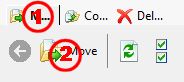 Click the Upper Tab (#1) to set
the mode you wish to use: Move, Copy or Delete. Select files, edit paths (see next paragraph). Click button (#2) to actually
Move, Copy or Delete the selected files.
Click the Upper Tab (#1) to set
the mode you wish to use: Move, Copy or Delete. Select files, edit paths (see next paragraph). Click button (#2) to actually
Move, Copy or Delete the selected files.Calling from P3dO
Scene
Click the scene and wait for it to load in P3dO, then call the plugin. The Scene and its References are listed.Directory
All files belonging to the directory and their References are listed.Toolbar buttons
MoveCopy
Moves or Copy selected source files to the Output location (as indicated in "Output path"
column - the final output being "Runtime" + "Output path").Delete
Delete the selected source files.You must take great care deleting files belonging to a 3D scene because many 3D applications share the same file for severall scenes. For example Poser geometries (.OBJ) are often shared between many files.
Refresh
This is a helper button that can be used to re-evaluate grid content.
It will check again for existing source file and collision detection.Select AllUnselect All
Quick select/unselect helper (ctrl+A shortcut is equivalent to "Select All")Destination subfolder
The Poser relative path in not necessarily the one you want to copy your files to.
This button offers various alternative solutions:- copy files to their Poser destination (Tree Structure)
- copy References into their Scene directory (Scene)
- copy all into the destination directory (Flat)
Non 3D files - e.g. pictures - don't have a relative path and thus simply go into the destination directory. This button has no effect on such files destination.
List columns
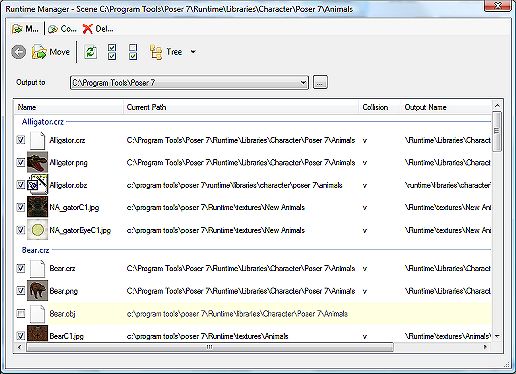
Name and Current Path columns are the actual
file location.
When a file does not exist the Whole line is grayed and the file can't be edited (it will be ignored
for any further action).Output to and Output Name make the final file
location. Output Name being the path relative to Destination directory.Output Name can be edited by hand, thus allowing to modify the output path or file name (none of these modification is reported to the Poser file).
The destination Runtime may be changed by selecting a Runtime in the runtime combo. You may also choose any other directory by using the Folder selection button.
Collision a check mark in this column indicates
the destination file already exists.warning: if you edit an Output Name collision status will not be checked. Click the Refresh button to do so.
Notes
- Files who don't belong to the same Runtime as the main Poser file (i.e. Figure or Prop file) are unselected by default. This to avoid copying or moving shared Geometries and Textures belonging to root Runtime.
- During a Move or Copy Destination directory structure is automatically created (missing directories will be created).
- After a Move or Deletion empty directories are deleted. That is directories where the files were previously stored. For safety reasons those directories parent directories are not checked nor deleted.
- If a destination path is equal to the origin Runtimes Manager will ignore Move & Copy commands. This by design to allow regrouping a Figure reference into the Figure Runtime without bothering for files already in the right directory.
Directories, Subdirectories or Search results as source
Copy/move directory can manage much more than simple directories. As any other plugin it is getting data from P3dO's current set. Thus if P3dO set is loaded with a directory and its subdirectories (Explore Subfolders), or is a search result (Find dialog), the Manager will be able to deal with those as well.
warning: it may take time to gather all the files related to the 3D files in a directory, it will take even more time in subfolders mode. So, it is not recommended to manage too many directories at a time.
Runtimes Manager Copy/move Scene vs InDepth Scene Manager
P3dO also has a Scene Manager. Available in InDepth window | Manage button.
InDepth is ideal for many things like copying, pasting, renaming,... while Runtimes Manager main purpose is to copy/move a scene and automatically restore the directory structure.
These are 2 complementary tools for managing your 3D content.