
 |
 Overview
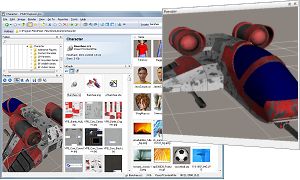
P3DO Organizer pro is a software for viewing and managing 3D Objects,
3D Animations & Digital Pictures with a simple Explorer-ish look and feel.P3DO stands for Photo 3D Exploration software.
P3DO Explorer pro is a more complete version of P3DO Explorer (freeware).
We made this P3DO vs P3DO pro comparison to help you decide which fits your needs best.
P3DO pro has special features for the following Softwares:
 Bondware Poser 3D. P3DO pro is a major Poser 3D library manager.
 Daz Studio
 Daz Carrara overview here
Latest News
Get your P3DO pro license
2 years with free updates
 |
Features list
 40 3D formats viewing
 3D animation
 Digital Photography
 View from ZIP/RAR/7Z
 3D Scene manager
 Poser CR2, PZ3, PP2, HR2 viewer
Loads all Poser 3D files including their compressed counterparts (CRZ, PZZ, PPZ, HRZ).
Poser 3D viewing is not complete yet and lacks scaling. It will be steadily improved.
(Poser 3D viewing is exclusive to P3dO).
Poser 3D viewing is not complete yet and lacks scaling. It will be steadily improved.
(Poser 3D viewing is exclusive to P3dO).
Basic feature for each format is: 3D viewing (including from Zip/Rar/7z Archives),
Scene Manager support, conversion to OBJ and thumbnail caching.
Detailed list in File Formats page.
Detailed list in File Formats page.
P3DO is saving a cached thumbnail for each 3D file that doesn't have a
thumbnail otherwise. The thumbnail is generated from P3DO's 3D viewer
and saved in a cache database working the same way as Windows' one.
Save as support from any supported 3D file format to Wavefront Object.
Options for centering, dropping to flore, scaling (global scale), exporting normals, exporting UVs.
Poser compatible Save as.
Options for centering, dropping to flore, scaling (global scale), exporting normals, exporting UVs.
Poser compatible Save as.
Viewers and players (thumbnails, 3D and pictures) are able to read files directly from
archives (without actually unzipping anything).
3D viewing include Textured render (the textures are also fetched from the archive).
In P3DO's thumbnails view archives are presented with thumbnails taken from pictures contained inside making it easy to identify the archive at first glance.
Archives support also include a Text file viewer to view ReadMe without opening the archive, and basic password (password has to be added to the name).
ZIP, RAR, 7Z, CBR, CBZ, GZ (no tarball) formats supported.
3D viewing include Textured render (the textures are also fetched from the archive).
In P3DO's thumbnails view archives are presented with thumbnails taken from pictures contained inside making it easy to identify the archive at first glance.
Archives support also include a Text file viewer to view ReadMe without opening the archive, and basic password (password has to be added to the name).
ZIP, RAR, 7Z, CBR, CBZ, GZ (no tarball) formats supported.
Skeleton (Boned) display of a Poser Poses with animation support.
Read BVH player below for a detailed description of the 3D animation player.
The viewer also as the ability to show Poser Hands (HD2) the same way it does for PZ2.
(Poser 3D viewing is exclusive to P3DO).
Read BVH player below for a detailed description of the 3D animation player.
The viewer also as the ability to show Poser Hands (HD2) the same way it does for PZ2.
(Poser 3D viewing is exclusive to P3DO).
Skeleton (Boned) display of a BVH motion with animation support
(screenshot).
The media player like viewer includes: time/frame info display, framed trackbar, multimedia keyboard support, fast forward button, right-left bones with distinct colors, ability to save a 3D animation to GIF animation.
P3DO's thumbnails view shows the number of frames of each BVH and BVHs are assigned a thumbnail by the cache engine.
)
The media player like viewer includes: time/frame info display, framed trackbar, multimedia keyboard support, fast forward button, right-left bones with distinct colors, ability to save a 3D animation to GIF animation.
P3DO's thumbnails view shows the number of frames of each BVH and BVHs are assigned a thumbnail by the cache engine.
This is a tool that split a files in Row, columns in order to be able to preview
a texture animation.
This is not animated texture support in the 3D viewer but a preview of the texture animation.
This tool can also be used to view sprites the same way.
This is not animated texture support in the 3D viewer but a preview of the texture animation.
This tool can also be used to view sprites the same way.
Simply play anime GIFs and gives information on the animation (number of frames,
frame rate, duration).
The media player like viewer includes: time/frame info display, framed trackbar, multimedia keyboard support, fast forward button, auto play option.
The media player like viewer includes: time/frame info display, framed trackbar, multimedia keyboard support, fast forward button, auto play option.
Among the most popular:JPEG, BMP, PNG, PSP, PSD, GIF, TIFF,
but also exclusive like Poser RSR, BUM and Vue d'Esprit VEG, VOB, VUE.
Image viewing is free, P3DO pro just had the ability to view pictures from archives (except for TIFF).
Detailed list in File Formats page.
Image viewing is free, P3DO pro just had the ability to view pictures from archives (except for TIFF).
Detailed list in File Formats page.
Shows the UV Map of a given mesh. The displayed map takes into account the materials
and groups visibility making it possible to generate a partial map.
The map may be saved to the disk.
The map may be saved to the disk.
Morphs, materials, attached files detailed in sided info.
Files whose location is not known are colored in red.
Files whose location is not known are colored in red.
Scene Manager is a great time saver for 3D files scattered in various locations,
like Poser files in Runtimes.
Scene manager lists the content of a 3D file (not only for Poser, all supported 3D formats) in a thumbnailed view. Wherever those files are on your disk you will see them and be able to treat them as if they were in the same directory.
With Scene Manager it is easy to remove a Scene at once, copy, edit, show, navigate to its components. And apply whatever your Explorer context menu offers (like coyping, zipping the Scene).
Scene manager lists the content of a 3D file (not only for Poser, all supported 3D formats) in a thumbnailed view. Wherever those files are on your disk you will see them and be able to treat them as if they were in the same directory.
With Scene Manager it is easy to remove a Scene at once, copy, edit, show, navigate to its components. And apply whatever your Explorer context menu offers (like coyping, zipping the Scene).
Another Poser dedicated tool similar to the above but working a different way.
Wereas 3D Scene Manager is only able to copy/paste the Windows classic way, the AwkPlugin will copy/move the entire directory structure of your scene to the output runtime.
This makes it possible to change a scene location, or install it to a Runtime, in a few seconds.
more
Wereas 3D Scene Manager is only able to copy/paste the Windows classic way, the AwkPlugin will copy/move the entire directory structure of your scene to the output runtime.
This makes it possible to change a scene location, or install it to a Runtime, in a few seconds.
more
Librarian will scan your Poser and Daz|Studio runtimes libraries and will
report wrong references or missing files.
Librarian is a report tool, it does not offer any fix utility - at the moment. But Librarian has a major advantage it is fast, and I really mean it.
Fast - As an example, scan Poser libraries with as much as 42,000 files (including thumbnails) in 15 minutes - this is Librarian !
To finish with speed, Librarian has also been designed for even more speed optimization : you may select the runtimes you wish to explore, you may choose a special report mode (called "Manage Scan result") that will render a report within seconds.
Report - The report itself is a html file that lists the figure files (any Poser file) with a wrong reference path, and the list of those wrong references.
You may select which kind of files are to be reported, for which runtime.
more
Librarian is a report tool, it does not offer any fix utility - at the moment. But Librarian has a major advantage it is fast, and I really mean it.
Fast - As an example, scan Poser libraries with as much as 42,000 files (including thumbnails) in 15 minutes - this is Librarian !
To finish with speed, Librarian has also been designed for even more speed optimization : you may select the runtimes you wish to explore, you may choose a special report mode (called "Manage Scan result") that will render a report within seconds.
Report - The report itself is a html file that lists the figure files (any Poser file) with a wrong reference path, and the list of those wrong references.
You may select which kind of files are to be reported, for which runtime.
more
This unzipper plugin is a classic unzipper with some Poser dedicated features.
Quick selection of Poser runtimes, compare and fix Zip archive folder hierarchy and Zipped Poser file paths, ability to customize the installation by renaming the files before unzipping, basic undoing of the installation, checks for collisions, list files belonging to a Poser scene.
more
Quick selection of Poser runtimes, compare and fix Zip archive folder hierarchy and Zipped Poser file paths, ability to customize the installation by renaming the files before unzipping, basic undoing of the installation, checks for collisions, list files belonging to a Poser scene.
more
PoserFavorite will update the P3DO Favorites from your Poser runtimes.
With PoserFavorite you can have all your Poser libraries structure copied in P3DO in a few seconds. Then it is up to you to modify the P3DO Favorites (for example all Vicky dedicated folders together). PoserFavorite will respect this organization and still be able to reflect any change in your Poser libraries next time you will run it.
more
With PoserFavorite you can have all your Poser libraries structure copied in P3DO in a few seconds. Then it is up to you to modify the P3DO Favorites (for example all Vicky dedicated folders together). PoserFavorite will respect this organization and still be able to reflect any change in your Poser libraries next time you will run it.
more
- PoserPython is a plugin to open files in Poser directly from P3DO. With
PoserPython you don't need to use the Poser library palette anymore
more
- Poser cloth figure detection: when clicking on a file P3DO will display which figure it belongs to (i.e telling it's a Victora cloth) which is a most valuable information.
- Automatically generates missing Poser thumbnails from 3D Render.
- P3DO makes only 1 thumbnail from both Poser file and its pictures and treats them as a whole. When you copy, move, rename, delete a Poser file P3DO will take care of the picture for you.
- Poser cloth figure detection: when clicking on a file P3DO will display which figure it belongs to (i.e telling it's a Victora cloth) which is a most valuable information.
- Automatically generates missing Poser thumbnails from 3D Render.
- P3DO makes only 1 thumbnail from both Poser file and its pictures and treats them as a whole. When you copy, move, rename, delete a Poser file P3DO will take care of the picture for you.
Wizard that convert any supported picture file format to JPEG, PNG, BMP or GIF.
more
more
You may switch between 2 modes : Directory mode which is Rsr2Png classic dialog and
Runtimes mode.
In Runtimes mode Rsr2Png offers a selectable list of Poser and Daz Studio runtimes for quick conversion Runtimes as a whole.
more
In Runtimes mode Rsr2Png offers a selectable list of Poser and Daz Studio runtimes for quick conversion Runtimes as a whole.
more
P3DO is the only viewer able to show thumbnails from Vue d'Esprit files.
Wireframe, flat shaded, smooth shaded, cartoon, texture mapping polygon modes.
Real time 3D render.
Pattern renamer renames and renumber files and/or directories.
With P3DO pro Pattern Renamer (which is free otherwise) is able to operate in subfolders.
Pat is collecting data from P3DO and is using P3DO's subfolders exploration capability.
more
With P3DO pro Pattern Renamer (which is free otherwise) is able to operate in subfolders.
Pat is collecting data from P3DO and is using P3DO's subfolders exploration capability.
more
This feature is an extension of the favorite layout. You can name as many layouts as you wish and
switch to one in just 2 clicks.
Sided image preview enables quick preview of pictures.
Zoom window enables full view of pictures.
Zoom window enables full view of pictures.
Auto focus is the way you want to zoom pictures. 5 preset ways : Actual size, Best Fit,
Fit to Window, Fit Horizontally, Fit Vertically; making it as easy to stretch small pictures or
to scale down large photos at ones
Show and save a picture into its color components (Red, Green, Blue, Alpha).
Channels may be combined together.
Easy clockwise or counterclockwise rotation (and saving) of JPEG pictures from the
thumbnail view or preview window.
Thumbnail mode is quick and tile mode also offers thumbnail pictures.
P3DO display is fast and powerful. P3DO can handle thousands thumbnails making it a real graphic
file manager.
Slide all pictures on on a limited picture set with the selection slide command.
Prints your pictures or the thumbnails set.
And also
8 languages, plus english of course
P3DO takes the best from Windows Explorer and adds picture oriented features.
Ability to scan a whole folder hierarchy instead of working on one folder at a time.
As a file manager P3DO offers 2 ways to rename files. The mass renamer plugin (Pattern Renamer)
can rename a whole picture set in just one click.
UI is based on docking windows which can be dragged, dropped, resized, hidden according to your
wish and needs. And also saved thank to the Layout Manager.
PLugins are external addons that plug into an application. P3DO has 7 plugins (and growing).
General purpose plugins are included with P3DO setup, others are freely available for download on our donwload page.
There are 10 plugins for P3DO.
General purpose plugins are included with P3DO setup, others are freely available for download on our donwload page.
There are 10 plugins for P3DO.
Requirements
Runs on any Windows system from Windows XP up to W10.This 32 application Runs fine under 64 bits.