
Latest News


|
|
January 25, 2013 - Partial Faces
I have spend most of my leisure time playing with Poser, now it's time to play with P3dO again.The following update is directly inspired from my own usage of P3dO as a Poser library palette replacement. Especially the feature I use the most in P3dO: Partial Poses
This is a plugins only update with 3 plugins:
PoserPython 2.4.7 - PatternRenamer 2.4.6 - Image2Image 2.4.6
 Note: Partial Poses
is part of PoserPython plugin. It is only compatible with P3dO 2.4.6 and above.
Note: Partial Poses
is part of PoserPython plugin. It is only compatible with P3dO 2.4.6 and above.
|
 Partial Faces
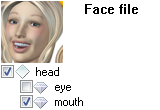
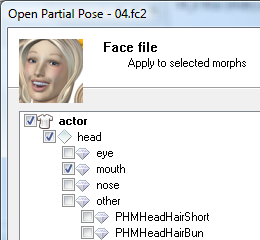
The faces morphs are now logically grouped like the poses morphs are, so it is easy and quick to only apply part of the Face: eyes, mouth and/or nose.
As shown on the side picture, this face will only apply the mouth part of the Face pose.
Partial HandsThis was already possible but you had to uncheck the root hand node and then reselect the fingers. Now available in a single click
Other PluginsImage2Image - this is a technical update for the plugin preparing further additions, among which resizing capability.
|
April 28, 2012 - P3dO 2.4.6
Here I am again and here comes P3dO 2.4.6.I have been very busy professionnaly, this is why there has been very few updates in 2011. So P3dO is on the road again. I am preparing a major update for this fall or Winter, and as usual will release intermediary updates with ongoing finished stuff.
This version introduce a new feature called "External Runtimes" and contains an update to the extraordinary PoserPython's Open Partial Pose dialog - I am really fond of that one !
Go get P3dO 2.4.6, and don't forget the plugins:
 DownloadWarning: External Runtimes is part of Runtime Manager
plugin, Open Partial Pose is part of PoserPython plugin. Both are only compatible with P3dO 2.4.6 and above.External Runtimes
DownloadWarning: External Runtimes is part of Runtime Manager
plugin, Open Partial Pose is part of PoserPython plugin. Both are only compatible with P3dO 2.4.6 and above.External RuntimesAs you guess it is a Runtime which is not listed within Poser or Daz Studios Runtimes list.
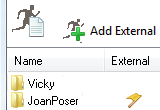
A lot of you people have been asking me to support that kind of Runtimes : done.
Runtime Manager now has a new menu entry (Tools menu): "Poser/Daz Runtimes List" in which you may easily plug and unplug Runtimes. Those Runtimes will only be visible to P3dO, but P3dO will treat them as regular Runtimes.
Only visible to P3dO means you can't use them to open a file in Poser. You know, you may still open a Pose or a Face - You are just bound to Poser limitations when opening outside a regular Runtime.
Visit Runtime Manager's Runtimes List page for more details.
PoserPython - Open from ZIPIt is now possible to Pose a PZ2 directly from a ZIP into Poser.
The file has to be standalone like a Pose, or if it is a material related to Textures or else, the References must have been unizpped first. So it is designed for and more suitable to Poses.
Available for Poses, Hands, Faces, INJ/REM, Materials, Lights, Cameras - compressed or not. Figures, Hairs and Props are not supported.
Open Partial Poses: INJ/REM, HandsThat Expression is the right one except you want an eye blink ?
That Hand pose is the right one except for the thumb ?
Open Partial Pose is the answer : you may select the actor you want to Pose.
Hands, INJ/REM and Faces have been added to Poses and MATs.
And... partial opening from ZIP is also possible !
Open Partial Poses is certainly one of the best time saver tool for Poser - I just can't imagine Posing anymore without it.
Visit PoserPython's Open Partial Pose page for more details.
Free version users noteAnd this version still introduce Poser 9/2012 compatibility, InDepth toolbar plugin icons and the Mover plugin.
FYI - As for Poser 9/2012 compatibility I didn't let you down. I recall that using P3dO or unregistered P3dO pro is similar. So it was possible to switch to P3dO pro until now. Also note that even the unregistered P3dO pro has some free features -a few of them- which P3dO doesn't offer, and is updated more frequently.
TranslationsI am looking for some good will to update the following translations:


|
September 22, 2011 - Poser 2012 & Daz Studio 4
This is just a quick (but not dirty) update to fix PoserPython for the new version of Poser.The fix is available for both P3dO and P3dO pro. Download and install the Poser Plugins Pack.
P3dO pro users should also install P3dO since it contains other bug fix (including the nasty "Grid index is out of range" exception).
Go get the fix:
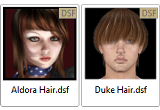
DownloadAlso available in this version is Daz Studio 4 DSF thumbnails support
There were no problem with Daz Studio update, the Pontari Productions opener plugin for Daz Studio is still working with DS4. God bless the Daz programmers.
As for P3dO, the programmer (me) has been taking a long rest for professionnal reasons.
I am now back to work on my beloved software and a PoserPython update is planned next month (sorry no automatic notification for plugins updates).
|
April 29, 2011 - P3dO pro 2.4.5
As usual 2.4.5 is a prequel to 2.5 which is due to be available this fall. 2.4.5 will be updated regularly this summer up to 2.5 release.There has been 2 other updates since 2.4 (last December). Because these were plugins updates there was no automatic updates notifications:
 March Objaction Mover - new plugin January PoserPython - Open partial Pose.
That one is really cute.
March Objaction Mover - new plugin January PoserPython - Open partial Pose.
That one is really cute.Now with 2.4.5 you also get the following:
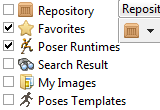
Repository Poser Runtimes & Preferred Views Favorites Menu context popup and Explore Favorites 7-Zip archive supportIt is a small update indeed, nevertheless there's also the usual bunch of minor changes and fixes.
Warning: Poser users,
most 2.4 plugins are not compatible with 2.4.5, you must install 2.4.5 Poser plugins pack with 2.4.5.Repository Poser Runtimes is a new view. It shows the last visited
directory in each Runtime Library Category thus allowing a quick navigation in Poser Libraries. Preferred Views is a customizable list of Repository views
in Options dialog. Check the views you use the most, you will switch to them
by clicking the  Repository button
(Repository toolbar or Ctrl Y shortcut). This is very handy to vary the Repository usage.
Repository button
(Repository toolbar or Ctrl Y shortcut). This is very handy to vary the Repository usage.note Search result, as shown in above picture, is not finished yet, it will be available with next update.
Favorites Right click context menu which allow deleting Favorites.
Rather tricky to use, you have to right click before the submenu pops up :( Explore Favorites command added to all submenus and also to the
above Popup. I recall that Explore Favorites will populate all links from a Favorites node,
it is some kind of Explore subfolders for Favorites.7-Zip archivesThat is: thumbnails, content list, image zoom and 3D object display.
Other additions and fix New faster library for JPEG pictures. 3D viewing: textures downsized to optimize memory usage. Find dialog: cancel button crash fix. Scenes, Data, Presets shortcuts added to Carrara menu. Mouse middle button (or wheel mouse click) on a link navigate
to the link's directory.
|
March 25, 2011 - Objaction Mover plugin
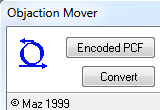
A new and free plugin this month: a P3dO version of the famous Objaction Mover utility by Maz. Mover is used to share meshes without violating authors copyrights.Recently Objaction Mover weblink went offline and Maz cannot be reached anymore, so I decided to provide the Mover plugin.
Back to old days I have been in contact with Maz and he kindly allowed me to do that plugin.
I am providing this plugin with the goal of being helpful to the Poser community, but all credits for Mover should go to Maz and Maz still retain the copyright for the Objaction Mover program, the Objaction Mover name and logo.
Objaction Mover pluginMover plugin interface is slightly different from the original Objaction Mover. However features are the same. PCF generated by the Mover plugin will be read by the original Objaction Mover and the contrary as well.
Visit Mover's plugin page for screenshot and details.
P3dO 2.4.5I am a bit late but first update is coming next month.
So far I can tell 2.4.5 has 7-Zip archives support and a new Repository view that greatly improves Poser navigation,... in April :)
|
January 21, 2011 - Open Partial Pose
This is the first update for P3dO 2.4.5 intermediary version prior to 2.5.It consists of PoserPython and Awk Runtime Manager plugins update.
Little to say about Awk plugin, just cosmetic changes to level it up to ZipInstaller plugin standards.
While PoserPython includes a new feature called Open Partial Pose, little dialog with great effect. Open Partial Pose is only available with P3dO pro 2.4 and above.
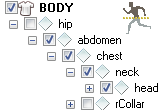
PoserPython 2.4.2 - Open Partial Pose What is it ? Strip a Pose of unwanted elements while
loading into Poser, thus applying only part of the Pose. How to use ?This is an idea I had in mind for long. When Posing a Figure there's often something in the Pose that doesn't match your needs, while the neighboring file has just the Arm Pose you are looking for.
- Click a Pose or Material (PZ2 or MT5)
- Click PoserPython button on InDepth toolbar and select: Open Partial Pose
- Unselect the actors or materials you don't want to be applied
- Click Ok
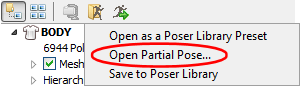
It is now possible to Pose just the Arm, or any other part of the body. And selection is quick an easy.
This PoserPython addition will save you a lot of time in the Pose process, and will give a much greater versatility to your Pose sets.
Open Partial Pose has been designed primarily for Poser Poses (PZ2), but it also does Materials (PZ2 and MT5) - except you strip materials there.
This is a first version, more is coming.
Visit PoserPython's Open Partial Pose page for more details.
P3dO 2.4.5First there are important updates on Plugins to come (ZipInstaller, Librarian and PoserPython) and also a new plugin.
So a first P3dO 2.4.5 should only be available in March.
|
December 26, 2010 - Quidam viewer
First, I would like to wish you a Merry Christmas and a Happy new Year.This year the traditional Christmas update comes with a good surprise: N-Sided Quidam added to the list of Softwares supported by P3dO.
This update also deals with new Poser XMP format.
Download P3dO 2.4
Quidam support
|
Quidam also comes with a library containing Hair, Cloths, Props, Poses and because It is more convenient to browse 3D libraries with P3dO I went to work on this. And so...
|
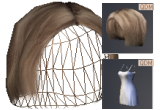
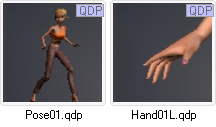
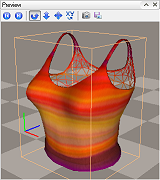
When browsing Quidam and Argile libraries P3dO
is showing QDM (Quidam Models) and QDP (Quidam Poses) thumbnails at a larger size than Quidam
does. And a 3D preview of QDM meshes with the usual list of
attached references (Textures) and the ability to read from archives.All you need to select the best props to fit your Quidam QUI in progress or to preview your own QDMs (complex Figure with attached Props).
Figures, Props, Hairs, Cloths, Furniture,... P3dO will show all.
note N-Sided gave me all requested information about the QDM format. Because export plugins are addons to Quidam, export of QDM to OBJ is not possible in P3dO.
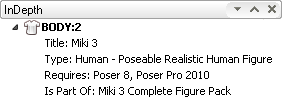
Poser XMP
|
What is interesting in the XMP are the Pose instructions and other such information.
P3dO is showing the most useful Metadata information at the top of the Figure InDepth tree, so that you can make the best use of it.
At the moment other information (mostly copyright) are not shown. I will complete this soon but Pose utils information will stay on top.
Translations
 Swedish translation has been updated thanks to another contribution by our all time Swedish
translator: Jennifer Lind. Your help is much appreciated Jen.
Swedish translation has been updated thanks to another contribution by our all time Swedish
translator: Jennifer Lind. Your help is much appreciated Jen.|
|