
Latest News


|
|
November 19, 2010 - P3dO 2.4 massive update
Lots of new features, lots of improvements make this version one of the most massive update in P3dO history. So I am sorry but this is also a massive announcement.Here's a summary of main additions:
ZipInstaller 2.4
Find dialog
Poser Categories colored nodes
Poser Navigation history
Enhanced Favorites
Runtime Manager 2.3.3
Pattern Renamer 2.4
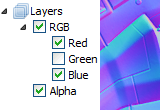
RGBA layers viewer
And also:
 OBJ exporter update
3DS Max thumbnails
Alpha channel & RGBA layers viewer
DDS, TPL, PXR images formats
EXIF data
OBJ exporter update
3DS Max thumbnails
Alpha channel & RGBA layers viewer
DDS, TPL, PXR images formats
EXIF data
OBJ exporter update
3DS Max thumbnails
Alpha channel & RGBA layers viewer
DDS, TPL, PXR images formats
EXIF data
|
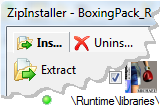
 ZipInstaller 2.4 - Poser dedicated unzipper Install from ZIP into Poser Runtimes. Uninstall from a previous ZIP extraction. ZipInstaller 2.4 - Poser dedicated unzipper Install from ZIP into Poser Runtimes. Uninstall from a previous ZIP extraction.Compared to 2.3 version, ZipInstaller 2.4 is a new software: new interface and much more features. Install from ZIPZipInstaller will list a Zip content, showing pictures thumbnails, collisions, Poser references and... will check if the Zip extraction paths matches the ones contained in the main Figure file. Helper dots ( 

 ) will indicate if you
may unzip as-is or not. ) will indicate if you
may unzip as-is or not.The example below shows 2 Textures ready to unzip. It also shows that those Textures already exist in target directory (yellow flag). |
|||
|
|
||||
But in case of error ( )
simply click the  Scene button
to fix destination paths. Very simple. Scene button
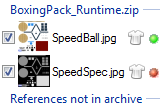
to fix destination paths. Very simple.Also, ZipInstaller will list Poser References not found in the Archive. Like this: |
||||
|
|
||||
|
Path error detection and fix, missing references, Collision detection, thumbnails.
ZipInstaller is a very rich Poser unzipper. Uninstall The uninstall doesn't require an Unsetup list or anything like that, simply open the ZIP again with ZipInstaller and select the Uninstall tab. The plugin will detect the files that have been installed from this ZIP. Click Uninstall, et voila ! Like Awk does empty directories will be removed as well. See also this ZipInstaller screenshot (popup) or visit ZipInstaller page for more information. |
||||
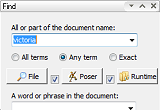 |
Find dialog Show directory content option
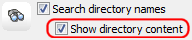
By clicking "Show directory content" all directories whose name match your query will be populated and their content shown in P3dO's search result set. Little box, powerful effect: type "Victoria V3 V4" in document name, check "Any term" and "Show directory content" and P3dO will fetch all your Victoria stuff. Sort by directory
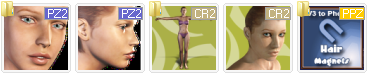
Thus the above "Victoria" search will be sorted by directory. A directory icon will indicate a directory change in the thumbnails view. Enhanced find
- All terms: i.e "V4 shoes" will return Victoria shoes files, - Any term: i.e "V4 shoes" will return both Victoria and shoes files (including non Vicky shoes), - Exact phase: i.e "V4 shoes" will only return files whose name matches "*V4 shoes*". |
|||
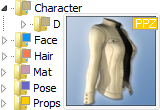 |
Directory Tree - Poser Categories with colored nodes Needless to say this is a great visual helper for many operations. Color is the same as the file extension block in thumbnails view. Of course other Categories not shown in the side snapshot are colored too, but also Textures and Geometry nodes. |
|||
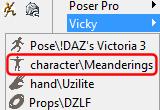 |
Poser Navigation history - Poser Categories Popup menu which is now reflecting your Poser navigation, like Poser does.
See side snapshot for what it gives. This will be another great time saver while browsing your Poser libraries. |
|||
|
Enhanced Favorites
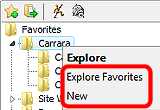
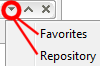
That little drop down button at the top of P3dO docking Windows is a menu. In the case of Repository it gives you the ability to switch the Repository to other views like: Favorites, My documents, any custom directory,... Thus you may use the Repository as your Favorites navigation system, and then have both Favorites and directory tree at the same time. In order to better use this feature the ability to customize
the Repository thumbnails has been added (a Tiled view is the best imho). Explore Favorites command has been added to context menu.
This is the same as Explore subfolders but where the subfolders would be your Favorites. Find command has been added to folder links to quickly
perform a Find from the Favorites nodes (Find command has also been added to Directory
cells in thumbnails view). Add to Favorites new dialog that will retain
previous directory and Favorites icons automatically customized to the corresponding
Poser Category (like PoserFavorite does). |
|||
|
Runtime Manager 2.3.3What can I do with Runtime Manager ? Scene Manager
Delete (uninstall) a 3D Scene and References at once
Move a 3D Scene and References to another RuntimeEmpty directories are deleted after the operation ! This not only for Poser but for other 3D file formats supported by P3dO as well: Carrara, 3DS, LWO,... Directory Manager
For Poser only there's also a Directory Manager that will grab all Scenes on a given
P3dO set (directory, subdirectories, search result,...) and do the same as above (Delete or
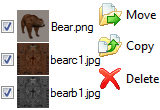
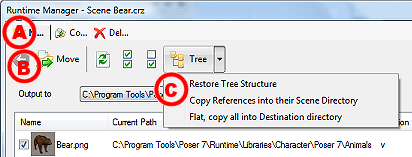
Move complete directories).Directory manager is the tool to arrange your Poser Runtimes: split a Runtime, Merge 2 Runtimes, do the basic cleanup and management. What's new ?(#A) Menu like header Tab bar to distinguish between the 3 modes (Move, Copy or Delete). (#B) Navigation button: when an operation has been concluded you may go back to the main window and perform another operation. Like deleting scenes one by one, copying the same scene to several destination. (#C) Destination path customization button: the Poser relative path is not necessarily the one you want to copy your files to. This button offers various alternative solutions. Visit Awk Runtime manager page for more information. |
|||
|
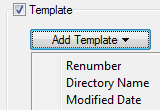
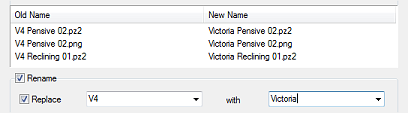
Pattern Renamer 2.4There are 4 templates available: Renumber Directory Name Modified Date Creation DatePat already used templates for Renumbering and you'll see usage is the same, except there is a supplementary step: clicking the "Add Template" button to insert other templates. Date templates customization (Day, Month, Year) is not that user friendly, this will be improved. Note that it is possible to insert regular characters between templates. Another feature is smooth refreshing: Past versions of Pat refreshed the whole P3dO thumbnails when updating. That one will just refresh the renamed cells, and the selection will remain unchanged, allowing another mass renaming on the same set. Visit Pattern Renamer page for more information. |
|||



) OBJ exporter update
OBJ exporter update
|
Since 1.9, you may convert current 3D scene to OBJ. Well, this is the purpose of that button
 and
is based on the Save As dialog.
and
is based on the Save As dialog.The whole exporter has been reviewed, simplified and new options added to generate MTL Texture paths.
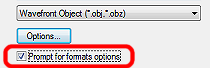
Tip when exporting to OBJ click that check box
("Prompt for formats options").
This will automatically show the format options dialog once you have selected the file name.3DS Max thumbnails
Special mention for this cute feature.P3dO is showing system thumbnails provided by Max shell extension. So you must have Max (or the shell extension) to see something.
If you know other Paint or 3D software with Windows thumbnails don't hesitate to
report them to me, I will add those asap.
btw Paint Shop Pro and Painter Windows like Explorer thumbnails support
are coming soon.Anime Studio thumbnailsThis is the first in a series of Updates to add Anime Studio support to P3dO.
Anime Studio now has a Poser like content manager but no doubt P3dO is far far ahead.
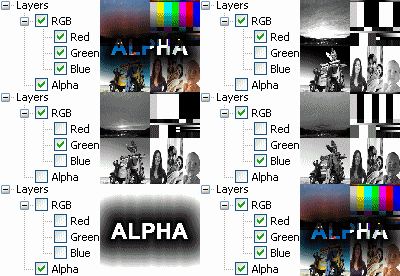
Alpha channel & RGBA layers viewer
I reviewed a number of image loaders to add RGBA information to the InDepth tree.These are: DDS, TGA, PSD, TIFF and BMP formats.
RGBA layer viewing is a feature which already exists in P3dO.
|
I reviewed this and added a ctrl+W shortcut to allow switching from keyboard.
As well ctrl+T has been added to set Transparent and Opaque picture preview from keyboard. Note that when "Opaque" preview is set, layer switch will loop through RGB channels, regardless of existing Alpha channel in picture.
New pictures formats and updates Direct Draw Surface (DDS):
I completed the already existing DDS reader.
P3dO is now supporting the most common DDS resources formats:A8R8G8B8, X8R8G8B8, A8B8G8R8, X8B8G8R8, R8G8B8, A4R4G4B4, X4R4G4B4, A8L8, V8U8, DXT1, DXT3, DXT5 and ATI2 (aka 3Dc aka BC5_UNORM).
Some others are coming, to complete the recommended requirement of a DirectX DDS viewer.
Nintendo Texture Palette Library (TPL): I8, RGB5A3, RGBA8 and CMPR
formats, first texture only. So far, P3dO is the only TPL browser. If you need some other
TPL formats, I just need TPL sample files to provide them. Pixar image (PXR). Probably not complete, I did this one
on my own from Photoshop exported pictures.EXIF dataThis first version is intended to validate the EXIF parsing, so feel free to contact me for any oddities. I expect a plural, here :).
Landscape vs Portrait, IPTC and GPS information are yet to come. I promise soon.
Other additions and fix Thumbnails cache speed has been improved - should say fixed -
and your pictures thumbnails will now load almost instantly. InDepth tree list INJ/REM content. Poser displacement maps added to the Poser references
list in InDepth tree and a bug fix on INJ/REM references. MTL added to the OBJ references list. Poser viewer deeper search for Textures
(now similar to Poser). Pose viewer allow viewing of partial PZ2
(body parts). ZipExplorer fixed number of files issue. Thumbnails view auto scroll when dragging over the edges. Rsr2Png 2.3.4 updated UI shift + delete will definitely delete a file like in Windows Explorer Custom Formats in options dialog: add new extensions to P3dO's internal filter list Directory tree: Faster in both expanding and refreshing. Fixed: when renaming a directory, the renamed node is automatically sorted. Fixed: navigation history and I updated to Vista like history navigation. Fixed: Carrara References list in Scene Manager (2.3 bug). Fixed: thumbnail vanish when dropping (copy) a file on a
Tree node. Fixed: crash when reading some Zipped/Rared picture formats (PSP,
PCX and probably some others).Translations
 Dutch translation updated, thank you again Frans.
 Spanish translation updated, thanks to Luis Salgado Duarte. Thank you so much Luis.
 French translation updated by me.
|
|
November 12 - P3dO pro 2.4 beta
P3dO 2.4 first release. The purpose of this upload is to validate 2.4 - Eagerly waiting for feedbacks :) Then 2.4 will be officially declared released next Friday and P3dO 2.4 will be released too.Of course 2.4 is similar to 2.3.5, since 2.3.5 was work in progress on 2.4, but there are still new features. Note that my what's new list from 2.3 to 2.4 contains as much as 34 features and bug fixes. Probably a record in P3dO history.
I will describe 2.4 in detail next week. Today let's just talk about new features since 2.3.5. For a more complete reference you may read the 2.3.5 updates page.
Poser Categories Popup menu
which is now reflecting your Poser navigation, like Poser does.See above snapshot for what it gives.
This will be another great time saver while browsing your Poser libraries.
EXIF dataThis first version is intended to validate the EXIF parsing, so feel free to contact me for any oddities. I expect a plural, here :).
Landscape vs Portrait, IPTC and GPS information are yet to come. I promise soon.
note The thumbnails cache speed has been improved - should say fixed - and your pictures thumbnails will now load almost instantly.
New pictures formats Nintendo Texture Palette Library (TPL). I8, RGB5A3, RGBA8 and CMPR
formats, first texture only. So far, P3dO is the only TPL browser. Pixar image (PXR). Probably not complete, I did this one
on my own from Photoshop export images.|
|
October 29, 2010 - Pattern Renamer 2.4
P3dO Explorer 2.4 will be available in 2 weeks so this month update is a limited one with two plugins:PatternRenamer 2.4ZipInstaller 2.4.Pattern Renamer 2.4Pat 2.4 comes with a handy 3 files WYSIWYG preview (above snapshot) of your renaming settings and a new concept in mass renaming called: templates.
There are 4 templates available:
Renumber Directory Name Modified Date Creation DatePat already used templates for Renumbering and you'll see usage is the same, except there is a supplementary step: clicking the "Add Template" button to insert other templates.
Date templates customization (Day, Month, Year) is not that user friendly, this will be improved.
Note that it is possible to insert regular characters between templates.
Another feature that will be activated with P3dO 2.4 is smooth refreshing: Past versions of Pat refreshed the whole P3dO thumbnails when updating. That one will just refresh the renamed cells, and the selection will remain unchanged, allowing another mass renaming on the same set.
Visit Pattern Renamer page for more information.
ZipInstaller 2.4This version adds a list of References not found in Archive. This may be a normal situation (if for example the missing Reference is Victoria OBJ), but it may not. Anyway, in case ZipInstaller is not able to find a Reference in the archive it will add it at the bottom of the archive content, like this:
See also this ZipInstaller screenshot (popup) or visit the plugin page for more information.
OtherP3dO 2.4 will be available in 2 weeks.
|
|